아이템을 랜덤스폰할 때, 단순히 콜리전의 영역을 이용해 랜덤 로케이션을 지정할수도 있지만, 지형의 형태에 따라 콜리전만 사용하기엔 애매한 경우가 발생할 수 있다. 그럴 땐 지형에 맞게 스폰해주는 방법을 따로 사용해야한다. 그 방법에는 여러 방법이 있겠지만, 이번엔 라인트레이스를 이용했다.
라인트레이스란
시작위치와 끝 위치를 지정해준 뒤 그 사이에 액터가 존재하는지 검색하는 기능이다.
총기, AI, 탐지 등 다양한 방법으로 응용이 가능하다.
코드 흐름
1. 랜덤위치 지정
2. 아래로 라인트레이스 진행
3. 해당하는 태그를 가진 메시 존재 확인
4. 스폰 허가
코드
FTransform ADFItemSpawner::SetSpawnTransform()
{
	FVector BoxExtent = SpawnArea->GetScaledBoxExtent();
	FVector BoxLocation = SpawnArea->GetComponentLocation();
	FVector SpawnLocation;

	FHitResult Hit;
	FCollisionQueryParams Params;
	Params.bTraceComplex = true;
	Params.AddIgnoredActor(this);

	int32 TryCount = 0;

	while (!bIsValidArea && TryCount < 50)
	{
		SpawnLocation = BoxLocation + FVector(
			FMath::FRandRange(-BoxExtent.X, BoxExtent.X),
			FMath::FRandRange(-BoxExtent.Y, BoxExtent.Y),
			BoxExtent.Z
		);

		FVector LineEnd = SpawnLocation + FVector(0.0f, 0.0f, -3000.0f);

		if (GetWorld()->LineTraceSingleByChannel(Hit, SpawnLocation, LineEnd, ECC_Visibility, Params))
		{
			AActor* HitActor = Hit.GetActor();

			if (HitActor && HitActor->ActorHasTag("ItemSpawnArea"))
			{
                bIsValidArea = true;
                DrawDebugLine(GetWorld(), SpawnLocation, LineEnd, FColor::Red, false, 3.0f, 0, 1.0f);
                DrawDebugSphere(GetWorld(), Hit.ImpactPoint, 10.0f, 8, FColor::Red, false, 30.0f);
			}

			else
			{
				TryCount++;

				if (TryCount >= 50)
				{
					UE_LOG(LogTemp, Warning, (TEXT("스폰 가능 구역 없음")));
				}

			}
		}

		else
		{
			TryCount++;

			if (TryCount >= 50)
			{
				UE_LOG(LogTemp, Warning, (TEXT("스폰 가능 구역 없음")));
			}
		}
	}

	FRotator RandRotation = FRotator(FMath::FRandRange(0.0f, 360.f), FMath::FRandRange(0.0f, 360.f), FMath::FRandRange(0.0f, 360.f));

	return FTransform(RandRotation, SpawnLocation);
}
빈 공간을 탐지할 때마다 카운트를 해주고 임의로 지정한 50회동안 탐지를 실패할 시, 메시가 존재하지 않는다고 판단하고 탐지와 스폰을 중단하도록 했다.
그러나 작은 문제가 있었다. 메시의 가장자리를 탐지했을땐 메시 탐지엔 성공했으나 아이템이 스폰되자마자 탁구에서 엣지나듯 모서리에 튕겨서 떨어져버리는 것이다.
이를 해결해주기 위해 주변 반경을 추가로 탐색하도록 했다.
보완 코드
FTransform ADFItemSpawner::SetSpawnTransform()
{
	FVector BoxExtent = SpawnArea->GetScaledBoxExtent();
	FVector BoxLocation = SpawnArea->GetComponentLocation();
	FVector SpawnLocation;

	FHitResult Hit;
	FCollisionQueryParams Params;
	Params.bTraceComplex = true;
	Params.AddIgnoredActor(this);

	const float Offset = 200.0f;
	const FVector Directions[4] = {
		FVector(Offset, 0.0f, 0.0f),
		FVector(-Offset, 0.0f, 0.0f),
		FVector(0.0f, Offset, 0.0f),
		FVector(0.0f, -Offset, 0.0f)
	};

	int32 TryCount = 0;

	while (!bIsValidArea && TryCount < 50)
	{
		SpawnLocation = BoxLocation + FVector(
			FMath::FRandRange(-BoxExtent.X, BoxExtent.X),
			FMath::FRandRange(-BoxExtent.Y, BoxExtent.Y),
			BoxExtent.Z
		);

		FVector LineEnd = SpawnLocation + FVector(0.0f, 0.0f, -3000.0f);

		if (GetWorld()->LineTraceSingleByChannel(Hit, SpawnLocation, LineEnd, ECC_Visibility, Params))
		{
			AActor* HitActor = Hit.GetActor();

			if (HitActor && HitActor->ActorHasTag("ItemSpawnArea"))
			{
				int32 HitCount = 0;

				for (const FVector& OffsetDir : Directions)
				{
					FHitResult NearbyHit;
					FVector Start = Hit.ImpactPoint + OffsetDir + FVector(0.0f, 0.0f, 20);
					FVector End = Hit.ImpactPoint + OffsetDir + FVector(0.0f, 0.0f, -200);

					if (GetWorld()->LineTraceSingleByChannel(NearbyHit, Start, End, ECC_Visibility))
					{
						if (NearbyHit.GetActor() && NearbyHit.GetActor()->ActorHasTag("ItemSpawnArea"))
						{
							DrawDebugSphere(GetWorld(), NearbyHit.ImpactPoint, 10.0f, 8, FColor::Yellow, false, 30.0f);
							HitCount++;
						}
					}

					if (HitCount >= 4)
					{
						break;
					}
				}

				if (HitCount < 4)
				{
					TryCount++;

					if (TryCount >= 50)
					{
						UE_LOG(LogTemp, Warning, (TEXT("스폰 가능 구역 없음")));
					}
				}

				else
				{
					bIsValidArea = true;
					DrawDebugLine(GetWorld(), SpawnLocation, LineEnd, FColor::Red, false, 3.0f, 0, 1.0f);
					DrawDebugSphere(GetWorld(), Hit.ImpactPoint, 10.0f, 8, FColor::Red, false, 30.0f);
				}
			}

			else
			{
				TryCount++;

				if (TryCount >= 50)
				{
					UE_LOG(LogTemp, Warning, (TEXT("스폰 가능 구역 없음")));
				}

			}
		}

		else
		{
			TryCount++;

			if (TryCount >= 50)
			{
				UE_LOG(LogTemp, Warning, (TEXT("스폰 가능 구역 없음")));
			}
		}
	}

	FRotator RandRotation = FRotator(FMath::FRandRange(0.0f, 360.f), FMath::FRandRange(0.0f, 360.f), FMath::FRandRange(0.0f, 360.f));

	return FTransform(RandRotation, SpawnLocation);
}
각 네 방향에 일정 거리만큼 오프셋하여 탐지시키고 한군데라도 메시가 없을 경우 스폰하지 않도록 했다.
결과
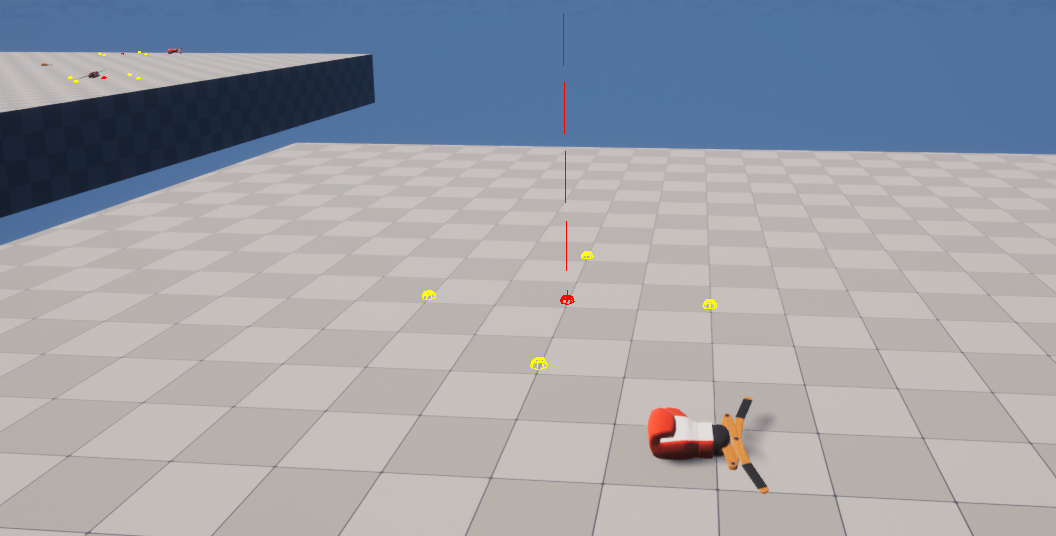
임의의 위치에 잘 스폰된다.
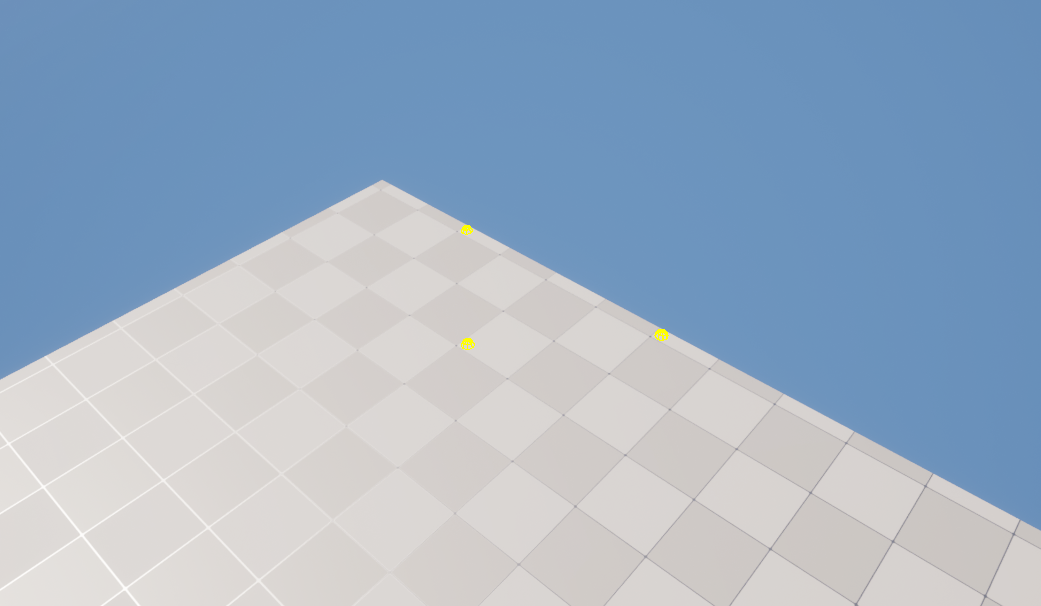
모서리에선 스폰되지 않는다.
'게임 개발 공부 > 언리얼엔진' 카테고리의 다른 글
| UE5 - Navigation Invoker (0) | 2025.04.22 |
|---|---|
| UE5 - 나이아가라 불꽃놀이 (0) | 2025.04.21 |
| UE5 - 데이터 애셋 (0) | 2025.04.08 |
| UE5 - 비헤이비어트리 기본 용어 (0) | 2025.04.02 |
| UE5 - GameInstanceSubsystem (0) | 2025.03.25 |


